The Platform Is Bigger Than Workers Now
There is a moment in every small engineering team where someone opens the Cloudflare dashboard to change DNS, then notices half a production platform staring back at them.
DNS is there. Cache is there. Workers are there. Then D1, R2, KV, Durable Objects, Queues, Workflows, AI Gateway, Vectorize, Browser Rendering, Access, logs, traces, and enough knobs to make a calm person start reading pricing pages like a detective novel.
Cloudflare used to be easy to explain. It was DNS, CDN, cache, and a programmable edge runtime. You put a Worker in front of a request, moved a little logic closer to the user, and called it infrastructure. Very tidy. Very innocent.
That version is too small now.
The modern Cloudflare stack is becoming a production operating layer. It has compute, static hosting, SQL, object storage, key-value storage, stateful coordination, queues, scheduled work, long-running workflows, database connection acceleration, vector search, AI inference, AI routing, browser automation, security controls, logs, analytics, and deployment configuration. You can still use one piece at a time, but the interesting thing is what happens when the pieces are arranged as a system.
The point is not that every system should be "all Cloudflare." The point is that Cloudflare now covers enough of the production surface that a small team can build a serious system without assembling five vendors before the first customer arrives.
That changes the architecture conversation. Instead of asking "which vendor do we need for this part?" the team can ask a cleaner question: what responsibility does this part of the system carry, and which Cloudflare primitive fits that responsibility without making the rest of the product harder to operate?
So this article is a map, not a shopping list. Please do not come out of it with seventeen new services and a look in your eyes that says "platform strategy." That is how dashboards become museums.
Start With The Request Path
The cleanest way to understand Cloudflare is to follow one request and watch where it gets into trouble.
A user visits a domain. Cloudflare already controls DNS, TLS, caching, firewall rules, bot protection, and routing before your application code runs. If the request is for a static site, Pages can serve the asset. If it is dynamic, Workers or Pages Functions can handle it. If the request needs data, the Worker can reach D1, R2, KV, Durable Objects, Hyperdrive, Vectorize, or an external service. If the request starts background work, Queues or Workflows can take over.
That matters because production architecture is mostly the art of deciding what must happen now and what can happen later.
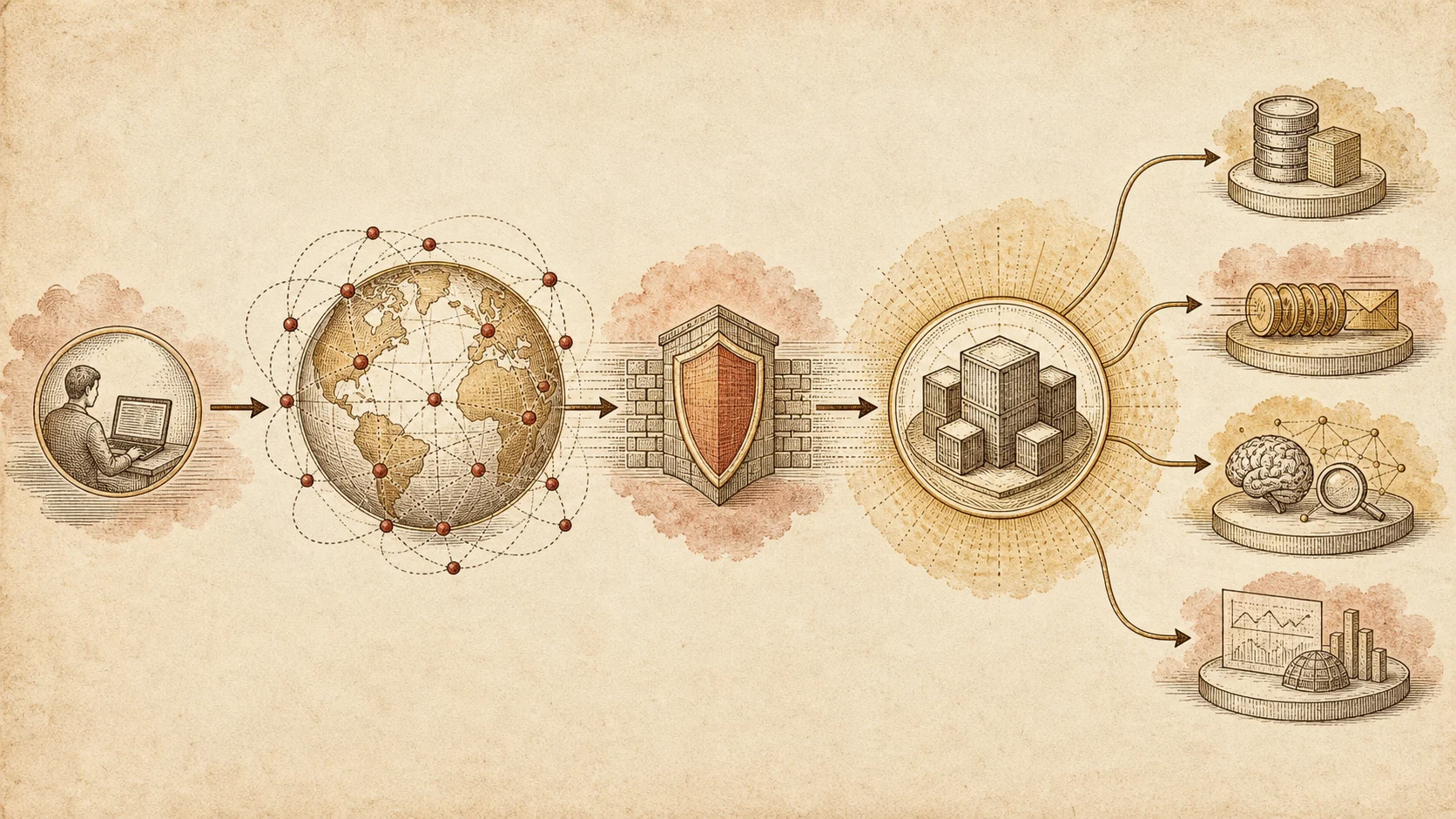
The diagram is simple because the principle is simple. Keep the user-facing path short. Move slow, unreliable, or repeatable work out of the request. Use the edge for routing, validation, composition, and fast reads. Use async primitives when the work has memory, retries, fan-out, or external dependencies.
A production system starts to feel calm when the request path is boring and the slow path is explicit. Boring is good here. Boring means the customer is not waiting while your app has a meaningful conversation with three APIs and a PDF renderer.
Workers Are The Default Compute Boundary
Workers are the center of the platform because they give you a standards-based runtime deployed across Cloudflare's network. Cloudflare describes Workers as a serverless platform for building, deploying, and scaling apps globally with no infrastructure to manage. That is the right mental model, but the important production detail is the boundary.
A Worker should be a boundary, not a junk drawer.
Put request parsing, authentication checks, routing, validation, lightweight orchestration, and response shaping there. Keep business rules in functions that can be tested without Cloudflare. Keep database access behind a small service layer. Keep third-party calls behind adapters.
The Worker is where the system meets the world. It should not become the place where every idea goes to live. That is not architecture. That is a drawer full of cables.
If the app is mostly static with a few dynamic endpoints, Pages plus Pages Functions is enough. If the app is API-first, use Workers directly. If you need a familiar TypeScript HTTP framework, Hono fits naturally because it keeps the runtime small, uses Web-standard primitives, and does not drag a Node server into an isolate runtime.
Pages Is The Front Door For Static Product Surfaces
Pages is the right default for marketing sites, documentation, static dashboards, client-rendered applications, and content surfaces. A lot of teams overbuild this part. They deploy a full server because they might need server logic later, then spend the next year maintaining a runtime for pages that could have been files.
Use Pages when the content can be built ahead of time. Add Pages Functions when a small dynamic edge endpoint is enough. Move to Workers when the application itself is the API.
This split keeps the product surface calm. Your website, docs, changelog, and article archive should not carry the same operational risk as your payment, booking, or agent workflow system. Static surfaces should feel like publishing. Application boundaries should feel like operations.
D1 Is The Small Relational Core
D1 is Cloudflare's serverless SQL database. It is the place for relational application data when the system benefits from SQL, transactions, constraints, and a schema that a human can reason about.
Use D1 for accounts, organizations, plans, projects, settings, memberships, small ledgers, feature configuration, editorial records, and application state that fits a relational model. Do not force everything into D1. Large files belong in R2. Hot global configuration can belong in KV. Per-room coordination can belong in Durable Objects. Search embeddings belong in Vectorize.
The mistake is treating D1 as "the database" in an emotional sense. In a Cloudflare system, there is rarely one storage product. There is a relational core, and then several storage surfaces around it. The work is choosing which kind of truth you are storing, not finding one bucket to spiritually contain everything.
Drizzle is a good companion for this layer because it keeps the schema close to TypeScript, gives you typed queries, and does not ask you to pretend SQL is not there. The schema remains readable. The migrations remain explicit. The application gets types without hiding the database.
R2 Is For Objects, Not Rows
R2 is object storage. Use it for uploads, generated files, exports, backups, images, documents, audio, video, static artifacts, and any data that is naturally a blob with metadata around it.
The clean pattern is to store the object in R2 and store the record about the object in D1. The D1 row knows who owns the file, what state it is in, what permissions apply, and which R2 key points to the bytes. R2 stores the bytes. Nice division of labor. Nobody has to become a hero.
That separation prevents a common startup problem: the database becomes a junk drawer for files, logs, and payloads that should never have been rows.
KV Is For Fast, Loose, Global Reads
Workers KV is useful when you want fast reads across regions and can tolerate eventual consistency. That makes it good for configuration, feature flags, public content fragments, cached API responses, routing tables, and low-risk lookup data.
It is not the place for money movement, ownership state, or anything where two users can race each other and create a business problem. KV is excellent when the question is "what should this edge request know quickly?" It is dangerous when the question is "what is the truth?"
Truth usually belongs in D1, Durable Objects, or an external database with stronger guarantees.
Durable Objects Are For Coordination
Durable Objects are the part of Cloudflare people often underuse because they do not fit the old stateless serverless story. Cloudflare describes them as a building block for stateful applications and distributed systems, especially when clients need coordination.
That means chat rooms, collaborative documents, multiplayer rooms, live dashboards, rate limit buckets, tenant-local counters, locks, presence, WebSocket coordination, and any workflow where "one thing must decide" is the core requirement.
A Durable Object is not just storage. It is a named coordination point. Requests that need to agree can meet there. That lets you avoid turning a database into a lock manager or pretending that a stateless function can safely coordinate many clients by itself.
Use Durable Objects when the problem has identity and concurrency. A room, user session, tenant, cart, live event, or shared document can each map to an object. That keeps coordination local to the thing being coordinated.
Queues Are The Pressure Valve
Queues are for background work. Every production system eventually needs a pressure valve because users should not wait for every email, webhook, enrichment job, image resize, audit log, notification, and third-party sync to finish inside the request.
The request should validate intent and record the fact. The queue should do the slow work.
This is where production systems become calmer. A payment webhook can enqueue fulfillment. A signup can enqueue onboarding email. An upload can enqueue processing. A support message can enqueue classification. The Worker returns quickly, and the system continues safely.
Queues also make failure less dramatic. If a provider is down, the message can retry. If a job is too slow, it does not hold the user's HTTP connection hostage. If volume spikes, the queue absorbs the shape of the traffic. The queue becomes the polite person at the door saying, "one at a time, please," which is a surprisingly useful job.
Workflows Are For Durable Processes
Queues are good for jobs. Workflows are better for processes.
A process has steps, sleeps, retries, checkpoints, and business meaning. "Send an invoice reminder after seven days unless the invoice has been paid" is a process. "Run a nightly reconciliation, call three services, retry failed steps, and keep a trace of what happened" is a process. "Start trial, wait, notify, downgrade, preserve audit history" is a process.
When a process matters, do not hide it inside a chain of ad hoc queue consumers. Give it a workflow. The code becomes easier to inspect, and the business can reason about what happens when time passes. That matters more than it sounds, because many production bugs are not logic bugs. They are time bugs. Time is where "simple" systems go to become awkward.
Hyperdrive Keeps External Databases In The Picture
Not every production system should move its primary database to D1. Many teams already have PostgreSQL. Some systems need a database feature, region, extension, operational habit, or compliance posture that D1 does not provide.
Hyperdrive exists for that reality. It accelerates and pools connections from Workers to existing databases. That makes it possible to keep a serious PostgreSQL core while still running the application layer at the edge.
This is an important point: Cloudflare is not only an all-in platform. It can also be the edge, API, cache, queue, and security layer around a conventional database.
Vectorize, Workers AI, And AI Gateway Are Separate Jobs
The AI side of the platform gets much easier when you stop treating it like one magical box and separate it into three questions.
Workers AI answers: where can the model run? Cloudflare describes it as serverless AI inference with access to open-source models on Cloudflare's network.
Vectorize answers: where do embeddings live for semantic search and retrieval?
AI Gateway answers: how do we route, observe, cache, evaluate, and control model calls across providers?
Do not blur those jobs. A production AI feature needs model execution, retrieval, observability, cost control, and failure handling. Sometimes Workers AI is enough. Sometimes AI Gateway sits in front of OpenAI, Anthropic, Google, or another provider. Sometimes Vectorize powers retrieval while the model call goes elsewhere. The architecture should make those choices visible instead of hiding model traffic inside a helper function.
The useful architecture is not "use Cloudflare AI for everything." It is "make model traffic visible, controlled, and close to the rest of the system." Otherwise you end up with model calls hiding in helper functions, which is a very modern way to lose money quietly.
Security Is Not A Later Layer
Cloudflare's older strength still matters. DNS, TLS, WAF, DDoS protection, bot rules, Turnstile, Access, Zero Trust, rate limiting, and cache rules sit before application code. That changes how you design the application.
You can block some traffic before it becomes compute cost. You can protect internal tools without building your own VPN. You can put Turnstile in front of forms. You can keep admin surfaces behind Access. You can make bot pressure a platform concern, not a route-handler concern.
Security still needs application logic. Auth, authorization, tenancy, audit trails, and data validation do not disappear. But the edge can remove a lot of noise before the app sees it.
The Services Around The Core
The core stack is not the whole platform. Cloudflare also has services that become important when the product leaves the clean world of CRUD and starts touching media, data movement, private networks, browser automation, and internal operations.
Images and Stream belong to the media path. If the product accepts user images or video, do not make the main application invent resizing, delivery, optimization, and streaming from scratch. Store the business record in the database. Store the file in R2 or the media product. Let the media service do the media work.
Email Routing is not a replacement for a product email provider, but it is useful for domain-level routing, aliases, and operational inboxes. It keeps small teams from building mail plumbing before they need it.
Browser Rendering gives Workers access to browser automation. That matters for screenshots, PDF generation, page inspection, testing, and controlled scraping jobs. It should not sit in the request path unless the user is explicitly waiting for the artifact. Most browser work belongs behind a queue.
Containers matter when an isolate is not the right runtime. Some workloads need existing Linux tools, heavier dependencies, or a process model that does not fit Workers cleanly. Containers do not replace Workers. They give the platform an escape hatch for workloads that need a more conventional execution environment.
Workers VPC and Cloudflare's network products matter when the application must reach private services. This is how the edge platform starts participating in enterprise architecture instead of living only on the public internet.
Analytics Engine, Pipelines, Logpush, and the observability products belong to the evidence layer. They help answer what happened, where traffic went, how jobs behaved, and which part of the system is changing. A production system without an evidence layer is just a pile of services with confidence.
Observability Is The Difference Between Platform And Pile
A platform is only useful if you can see it when something goes sideways.
Cloudflare gives you logs, analytics, traces, AI Gateway logs, Workers observability, and product-specific metrics. Use them deliberately. Name queues clearly. Structure logs. Include tenant, request id, user id when appropriate, job id, workflow id, and external provider ids. Treat observability fields as part of the architecture, not decoration.
The failure mode of serverless systems is not that nothing works. The failure mode is that everything works independently until the business asks one simple question: what happened to this customer?
Design the answer in advance.
The Practical Production Shape
If I were starting a production system on Cloudflare today, I would not use every service on day one. I would start with the smallest shape that gives the system a real operating spine:
- Pages for the public site and static product shell.
- Workers with Hono for the API boundary.
- D1 with Drizzle for the relational core.
- R2 for files and generated assets.
- KV for low-risk edge configuration and cached public reads.
- Queues for email, webhooks, enrichment, and slow third-party work.
- Workflows for long business processes.
- Durable Objects only where coordination is real.
- Hyperdrive only when the real database is external PostgreSQL.
- AI Gateway before any serious model traffic.
- Vectorize only when retrieval is part of the product.
- Turnstile, WAF, Access, and rate limits before the app gets clever.
That is not the maximum Cloudflare stack. It is the minimum stack that can grow. The rest should arrive when the product creates pressure for it: Durable Objects when coordination is real, Vectorize when retrieval is part of the product, Hyperdrive when PostgreSQL remains the right source of truth, Browser Rendering when the system needs controlled browser work.
The Judgment
Cloudflare's production platform is strongest when you stop thinking in vendor categories and start thinking in system responsibilities.
Compute belongs at the edge. Relational truth belongs in D1 or a real external database. Files belong in R2. Fast loose reads can live in KV. Coordination belongs in Durable Objects. Slow work belongs in Queues. Business processes belong in Workflows. AI calls belong behind a gateway. Retrieval belongs in Vectorize. Security begins before your code. Observability follows every request, job, and workflow.
The stack is not magic. It still needs boundaries, tests, migrations, review, and taste. Cloudflare can give you sharp tools. It cannot stop you from using them to build a very fast mess.
But for a small team, that is the point. You can spend less time assembling infrastructure and more time deciding what the system is actually supposed to do.